
Free Typing Test
How fast do you really type? Pick a test length, start typing the passage and the timer begins with your first keystroke. Mistakes are highlighted as you go, and at the end you get gross WPM, net WPM (after errors), accuracy and your personal best — all calculated in your browser.
- Free to use
- No sign-up
- Runs in your browser
Typing test
Touch Typing Practice Pack
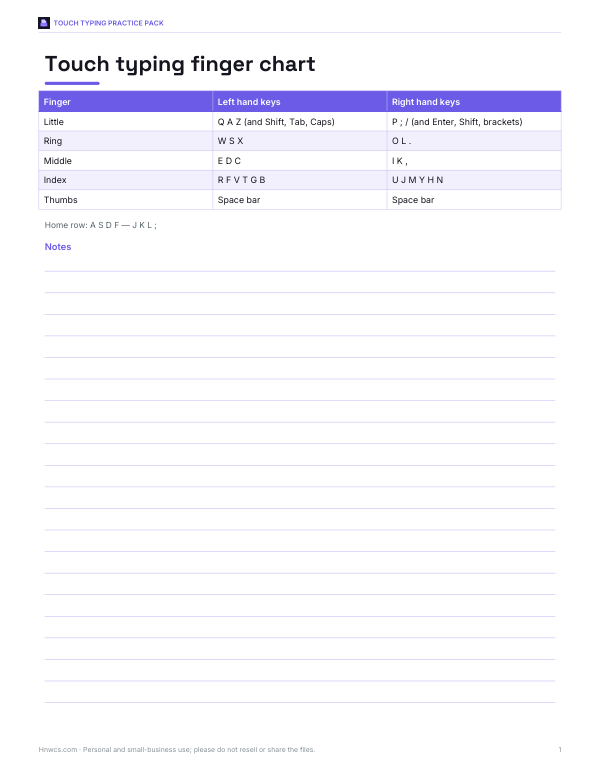
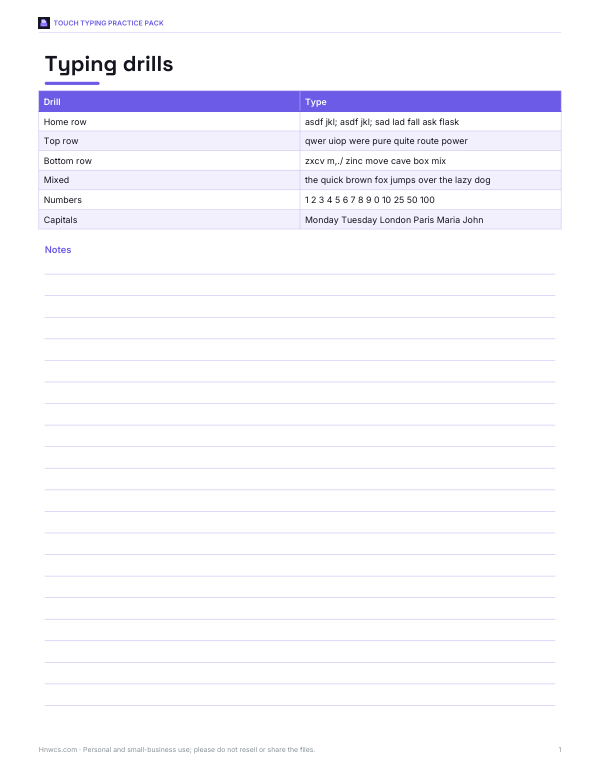
Printable touch typing practice: a colour-coded keyboard finger chart, home-row and top/bottom-row drill sheets, a 30-day practice plan and a WPM progress log.
- Finger chart (PDF)
- Drill sheets (PDF)
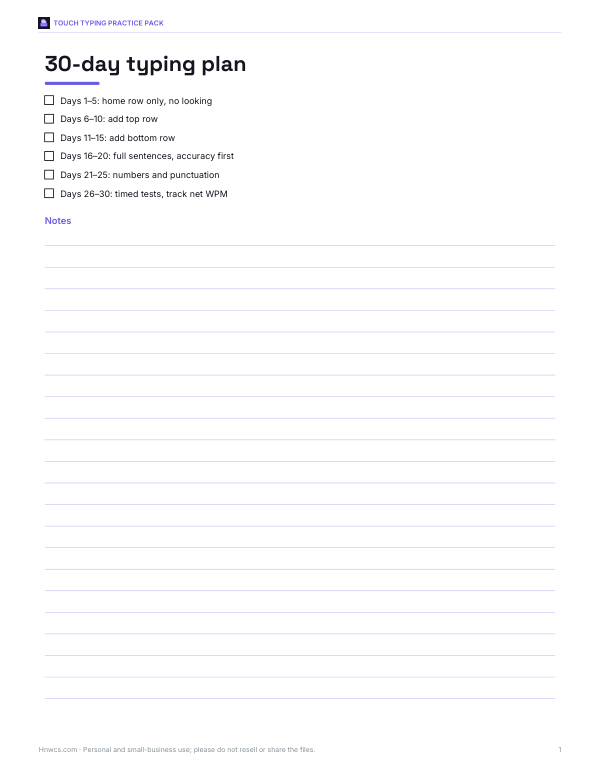
- 30-day plan (PDF, DOCX)
- Progress log (XLSX)
Formats: PDF, DOCX, XLSX. Instant download after payment (link valid 72 hours, up to 5 downloads). AI-assisted: the templates were drafted with AI help and reviewed and laid out before publishing.
$3.00 USD, one-time 4 files · about $0.75 each
- Instant download
- 7-day refund
- Secure checkout by Stripe
✓ Classroom use included
7-day money-back guarantee. Full refund within 7 days of purchase, even after you download.
Free sample: 30 Day Typing Plan (PDF, 54 KB)
Full refund within 7 days — see the refund policy and license.
License: personal and classroom use. Teachers may print and photocopy these files for the students in their own classes, and share them in a password-protected class space (e.g. Google Classroom). Please do not resell, redistribute, or post the files on public websites. One purchase covers one teacher.
Free printables
Single sheets you can print right now, no sign-up. The full pack adds every sheet in one download plus the editable files.
 Printable Typing Progress Log
How typing speed is measured
Typing speed is usually given in words per minute (WPM), where a “word” is standardised as five characters, including spaces and punctuation. That way long and short words count fairly. Gross WPM counts everything you typed; net WPM subtracts one word for every uncorrected error, so it rewards accuracy. Accuracy is the percentage of characters typed correctly.
Formulas
| Measure | Formula |
|---|---|
| Gross WPM | (characters typed ÷ 5) ÷ minutes |
| Net WPM | ((characters typed ÷ 5) − uncorrected errors) ÷ minutes |
| Accuracy | correct characters ÷ characters typed × 100% |
The test compares your text with the passage character by character. If you correct a mistake with backspace, it no longer counts as an error — but the time spent correcting lowers your speed.
Typical typing speeds
| Level | Approximate net WPM |
|---|---|
| Beginner / hunt and peck | under 25 |
| Casual typist | 25–40 |
| Average touch typist | 40–60 |
| Fast | 60–80 |
| Very fast / professional | 80–100+ |
These are rough bands commonly quoted for everyday typing; speeds vary with the text, keyboard and familiarity. Many office roles look for around 40–50 WPM with high accuracy.
How to take the test
- Choose 1, 2 or 3 minutes and a passage.
- Click in the box and start typing — the timer starts with your first keystroke.
- Type the passage exactly, including capitals and punctuation; errors turn red.
- Keep going until the timer ends; the passage repeats if you finish it.
- Read your net WPM, accuracy and personal best.
Pasting is disabled so results reflect real typing. Your best five scores are kept only in this browser.
How to type faster
- Learn touch typing: fingers rest on the home row (ASDF and JKL;) and each finger has its own keys.
- Don’t look at the keyboard — use the small bumps on F and J to find your place.
- Aim for accuracy first; speed follows once the movements are automatic.
- Practise 10–15 minutes a day rather than an hour once a week.
- Sit up straight with wrists level and relaxed.
- Practise difficult letter combinations and numbers separately.
Worked example
In a one-minute test you type 265 characters with 4 uncorrected errors. That is 265 ÷ 5 = 53 gross WPM, and 53 − 4 = 49 net WPM, with 98.5% accuracy. Correcting the errors as you go would have cost a few seconds but raised your net score.
Speed vs accuracy
Most typing tests reward net WPM because a fast but error-filled text needs fixing later. As a rule of thumb, aim for 95% accuracy or better before pushing for speed; below that, slowing down slightly usually raises your net score. Professional typists often trade a little raw speed for near-perfect accuracy because corrections are expensive in time.
Ergonomics for comfortable typing
| Setup | Guidance |
|---|---|
| Chair height | Feet flat on the floor, thighs roughly level |
| Elbows | About 90°, close to your sides |
| Wrists | Straight and floating while typing; rest them only during pauses |
| Screen | Top of the screen at or slightly below eye level, an arm’s length away |
| Keyboard | Flat or slightly negative tilt; avoid raising the back feet if it bends your wrists |
| Breaks | A short break every 30–60 minutes |
Practising with purpose
- Take a baseline 1-minute test and note net WPM and accuracy.
- Spend 10 minutes on drills for the keys where you make most errors.
- Take a 2-minute test at a comfortable pace, focusing on accuracy.
- Once accuracy is above 95%, push speed for a 1-minute burst.
- Repeat daily and log results — progress over weeks is more meaningful than one score.
Typing on different devices
Scores on a laptop, a mechanical keyboard and a phone can differ a lot. Test on the keyboard you use most, and don’t worry if a new keyboard lowers your speed at first — it usually recovers within a few days. Touch typing on a phone uses different skills; this test is designed for physical keyboards.
Using results for job applications
Some employers ask for a typing speed, especially for data entry, transcription, administrative and customer-support roles. Report net WPM with accuracy, for example “55 WPM at 98% accuracy”, and mention the test length. If a certificate is required, the employer will usually specify its own test.
About the passages
The practice passages were written for this site and use everyday vocabulary with mixed sentence lengths, capitals and punctuation, similar to real-world typing. Longer tests give more reliable results because one slow moment matters less.
Privacy
The test runs entirely in your browser. What you type is not uploaded; only your best scores are stored locally.
Frequently asked questions
What is a good typing speed?
Around 40 WPM is average; 60 WPM or more is fast.
How is WPM calculated?
Characters typed divided by 5, divided by minutes.
What is net WPM?
Speed after subtracting uncorrected errors.
Does correcting mistakes count against me?
Corrected errors aren’t counted, but the time spent lowers your speed.
Why is pasting disabled?
So the result reflects your real typing.
Should I take a 1-minute or 3-minute test?
Longer tests are more reliable; 1-minute tests are good for quick practice.
How can I type faster quickly?
Learn touch typing on the home row and practise accuracy daily for a few weeks.
Does capitalisation count?
Yes, the test compares characters exactly, including capitals and punctuation.
Is my personal best saved?
Your five best scores are saved only in this browser.
What does the red highlighting mean?
Characters typed differently from the passage; the space symbol ␣ marks a missed or wrong space.
Can I choose a different passage?
Yes, pick any of the six passages from the list.
Does the timer start immediately?
No, it starts with your first keystroke.
Is my typing uploaded?
No, it stays in your browser.
May I print and share these worksheets with my class?
License: personal and classroom use. Teachers may print and photocopy these files for the students in their own classes, and share them in a password-protected class space (e.g. Google Classroom). Please do not resell, redistribute, or post the files on public websites. One purchase covers one teacher.